OCR / Extraction Module
The OCR / Extraction Module in DocView Capture is responsible for converting scanned images into machine-readable text and extracting structured data.
This is where documents are transformed from raw page images into usable searchable text and field values that feed downstream indexing and workflows.
OCR / Extraction Workflow
1. Batch Initialization
- The system identifies the batch using its Batch ID.
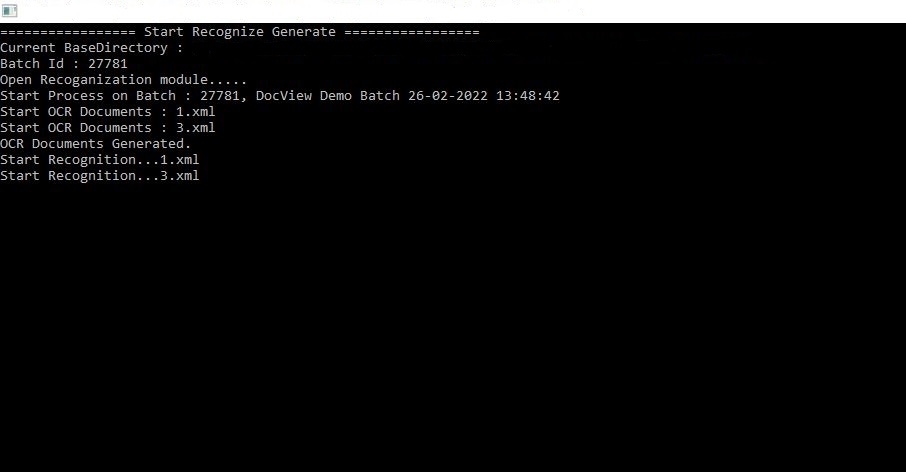
- Example: Batch 27781, DocView Demo Batch 26-02-2022 13:48:42.
2. OCR Process Start
- Each document in the batch is processed sequentially.
- File names (e.g.,
1.xml,3.xml) are generated to store OCR output.
3. Text Recognition
- The OCR engine analyses page images.
- Converts scanned text, numbers, and characters into machine-readable text.
- Produces XML output containing both recognised text and positional metadata.
4. Data Extraction
- After OCR is complete, the extraction engine identifies fields based on defined templates and rules.
- Example fields: Invoice Number, Date, Vendor Name, Total Amount.
- Recognition phase validates extracted values against regular expressions or lookup tables.
5. Results Storage
- Extracted data is linked to the document’s XML structure.
- Both the raw OCR text and extracted fields are stored for downstream modules (Review, Index, Export).
Key Operations Seen in Log
- Start OCR Documents –
1.xml,3.xml: OCR process begins, generating text output for each page. - OCR Documents Generated – OCR completed successfully, output saved in structured XML.
- Start Recognition –
1.xml,3.xml: Data extraction begins, pulling field values from OCR results.
Toolbar Overview
Home Tab
- Start OCR – Run OCR on selected batch.
- Stop Process – Halt ongoing OCR session if needed.
- Reprocess – Rerun OCR on selected documents for better accuracy.
View Tab
- OCR Output Viewer – Preview recognised text.
- Error Log – Shows OCR/recognition errors.
Settings Tab
- OCR Engine Selection – Choose engine (Tesseract, ABBYY, etc., depending on environment).
- Language Packs – Configure language-specific OCR.
- Extraction Rules – Define field rules, regex, and lookup references.
Status Indicators
- Processing – OCR in progress.
- Completed – OCR/extraction finished for the document.
- Failed – OCR unable to process (low quality scan or unsupported format).